Compare commits
10 Commits
f455ac17a7
...
dev
| Author | SHA1 | Date | |
|---|---|---|---|

|
1628efd971 | ||
|
|
75b21f3e6f | ||
|
|
61500c5a6b | ||
|
|
b7daa8cb20 | ||
|
|
f968a05ea5 | ||
|
|
b0086bfbd2 | ||
|
|
fc169823c9 | ||
|
|
a6f99fe82a | ||
|
|
672c090311 | ||
|
|
f345559f2f |
@@ -1,3 +1,122 @@
|
|||||||
|
# 无人直播教程
|
||||||
|
|
||||||
|
2016年1月14日更新
|
||||||
|
|
||||||
|
## Youtube直播
|
||||||
|
|
||||||
|
首先推荐arm开发板 [香橙派4pro](http://www.orangepi.cn/html/hardWare/computerAndMicrocontrollers/details/Orange-Pi-4-Pro.html) ,4gb版本 260元左右
|
||||||
|
|
||||||
|
可以使用技术栈实现无人直播
|
||||||
|
|
||||||
|
- [shellcrash](https://github.com/juewuy/ShellCrash)
|
||||||
|
|
||||||
|
- python+ffmpeg (实时转播)
|
||||||
|
|
||||||
|
- [docker-chrome浏览器 ](https://github.com/m1k1o/neko)+ (油猴脚本外挂[auto dismiss](https://greasyfork.org/zh-CN/scripts/557378-youtube-studio-auto-dismiss))
|
||||||
|
|
||||||
|
|
||||||
|
|
||||||
|
---
|
||||||
|
|
||||||
|
## 刷linux系统
|
||||||
|
|
||||||
|
准备`TF 卡`一张,建议64gb
|
||||||
|
|
||||||
|
买一个usb3.0的`读卡器`
|
||||||
|
|
||||||
|
在官方网站的百度网盘下载 `ubuntu server` 操作系统
|
||||||
|
|
||||||
|
在电脑下载软件` balenaEtcher`
|
||||||
|
|
||||||
|
<img title="" src="https://minioweb.hackrobot.cn/hackrobot/20260114234337_20260114_234355_341.png" alt="20260114234337_20260114_234355_341.png" width="435">
|
||||||
|
|
||||||
|
把系统镜像,刷写到TF 后,
|
||||||
|
|
||||||
|
开发板插网线,插电,就可以ssh登录了,账号密码 `orangepi`
|
||||||
|
|
||||||
|
```
|
||||||
|
ssh orangepi@开发板ip地址
|
||||||
|
```
|
||||||
|
|
||||||
|
---
|
||||||
|
|
||||||
|
## shellcrash
|
||||||
|
|
||||||
|
|
||||||
|
|
||||||
|
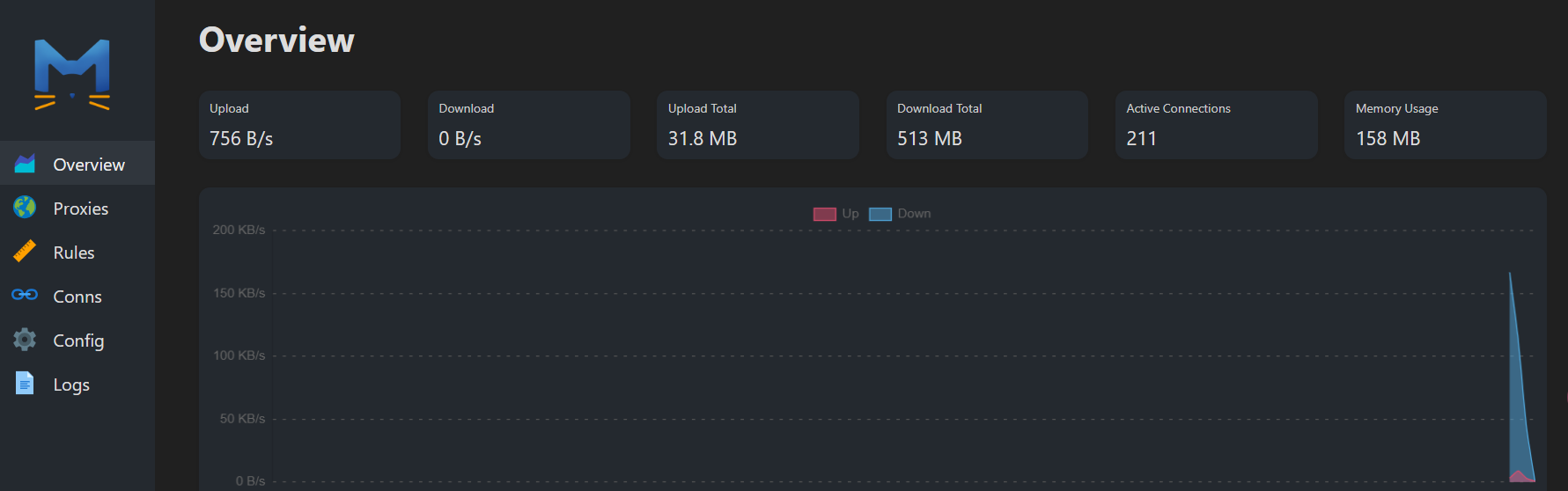
shellcrash可以看作`飞机`,加油之后科学上网才能飞往美国(全球其他国家)
|
||||||
|
|
||||||
|
加油步骤
|
||||||
|
|
||||||
|
- 去[nomadro.com](https://nomadro.com/),买vps服务器 和 静态住宅ip
|
||||||
|
|
||||||
|
- 谷歌搜索 [八合一](https://github.com/mack-a/v2ray-agent)`一键脚本`
|
||||||
|
|
||||||
|
进入香橙派系统后,复制一下命令并回车
|
||||||
|
|
||||||
|
```
|
||||||
|
export url='https://testingcf.jsdelivr.net/gh/juewuy/ShellCrash@master' \
|
||||||
|
&& wget -q --no-check-certificate -O /tmp/install.sh $url/install.sh \
|
||||||
|
&& bash /tmp/install.sh \
|
||||||
|
&& . /etc/profile &> /dev/null
|
||||||
|
```
|
||||||
|
|
||||||
|
按照提示,进行安装
|
||||||
|
|
||||||
|
---
|
||||||
|
|
||||||
|
## chrome浏览器
|
||||||
|
|
||||||
|
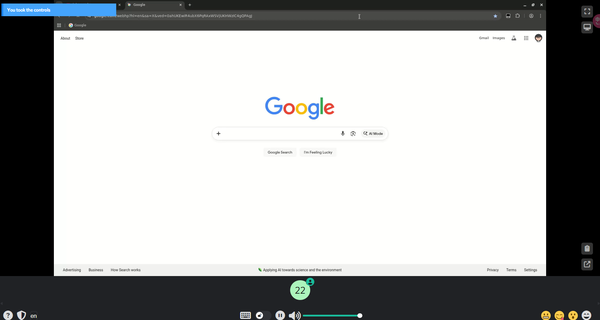
在电脑的浏览器,可以实时打开开发板里面的docker容器浏览器
|
||||||
|
|
||||||
|
|
||||||
|
|
||||||
|
> 数据持久化
|
||||||
|
|
||||||
|
```
|
||||||
|
mkdir -p ~/neko-chromium-profile
|
||||||
|
chown -R 1000:1000 ~/neko-chromium-profile
|
||||||
|
```
|
||||||
|
|
||||||
|
> 自定义策略
|
||||||
|
|
||||||
|
让浏览器可以运行外挂脚本
|
||||||
|
|
||||||
|
```
|
||||||
|
mkdir -p ~/neko-policies/managed
|
||||||
|
chown -R 1000:1000 ~/neko-policies
|
||||||
|
```
|
||||||
|
|
||||||
|
写入配置文件
|
||||||
|
|
||||||
|
```
|
||||||
|
cat <<EOF > ~/neko-policies/managed/policies.json
|
||||||
|
{
|
||||||
|
"ExtensionInstallForcelist": [
|
||||||
|
"dhdgffkkebhmkfjojejmpbldmpobfkfo;https://clients2.google.com/service/update2/crx"
|
||||||
|
],
|
||||||
|
"ExtensionInstallAllowlist": [
|
||||||
|
"*"
|
||||||
|
],
|
||||||
|
"ExtensionInstallBlocklist": [],
|
||||||
|
"DownloadRestrictions": 0,
|
||||||
|
"AllowFileSelectionDialogs": true,
|
||||||
|
"URLAllowlist": ["file:///home/neko/Downloads/*"],
|
||||||
|
"DefaultCookiesSetting": 4,
|
||||||
|
"RestoreOnStartup": 4,
|
||||||
|
"RestoreOnStartupURLs": ["https://nomadro.com"]
|
||||||
|
}
|
||||||
|
EOF
|
||||||
|
|
||||||
|
```
|
||||||
|
|
||||||
|
|
||||||
|
|
||||||
|
|
||||||
|
|
||||||
|
|
||||||
|
|
||||||
|
|
||||||
# 前言
|
# 前言
|
||||||
|
|
||||||
## 🚀 数字游民:地理套利与自动化杠杆
|
## 🚀 数字游民:地理套利与自动化杠杆
|
||||||
@@ -47,13 +166,6 @@
|
|||||||
|
|
||||||
- 聊天机器人
|
- 聊天机器人
|
||||||
|
|
||||||
---
|
|
||||||
|
|
||||||
## pdf文档
|
|
||||||
|
|
||||||
> 可以离线阅读
|
|
||||||
|
|
||||||
https://minioweb.hackrobot.cn/hackrobot/云手机20250919.pdf
|
|
||||||
|
|
||||||
---
|
---
|
||||||
|
|
||||||
|
|||||||
@@ -16,12 +16,47 @@ import { AtForm, AtMessage, AtDrawer, AtIcon } from "taro-ui";
|
|||||||
import { marked } from "marked";
|
import { marked } from "marked";
|
||||||
import infoText from "./info.md";
|
import infoText from "./info.md";
|
||||||
import bookText from "./book.md";
|
import bookText from "./book.md";
|
||||||
|
import { getPayEnv, getDeviceFromEnv } from "../../utils/payEnv";
|
||||||
// import youtubeIco from "../../images/youtube.ico";
|
// import youtubeIco from "../../images/youtube.ico";
|
||||||
import hackrobot from "../../images/hackrobot.jpg";
|
import hackrobot from "../../images/hackrobot.jpg";
|
||||||
// PocketBase 配置
|
// PocketBase 配置
|
||||||
const PB_URL = "https://pocketbase.hackrobot.cn";
|
const PB_URL = "https://pocketbase.hackrobot.cn";
|
||||||
const pb = new PocketBase(PB_URL);
|
const pb = new PocketBase(PB_URL);
|
||||||
|
|
||||||
|
/** PC 扫码支付:生成带二维码和轮询的 HTML 页面 */
|
||||||
|
function buildQrcodePageHtml(imgSrc, orderId, returnUrl, apiBase) {
|
||||||
|
const esc = (s) =>
|
||||||
|
String(s)
|
||||||
|
.replace(/&/g, "&")
|
||||||
|
.replace(/</g, "<")
|
||||||
|
.replace(/>/g, ">")
|
||||||
|
.replace(/"/g, """);
|
||||||
|
const statusUrl = `${apiBase}/nomadvip/order_status?order_id=${encodeURIComponent(orderId)}`;
|
||||||
|
return `<!DOCTYPE html><html><head><meta charset="utf-8"><meta name="viewport" content="width=device-width,initial-scale=1"><title>微信扫码支付</title>
|
||||||
|
<style>*{box-sizing:border-box;}body{font-family:system-ui;display:flex;flex-direction:column;align-items:center;justify-content:center;min-height:100vh;margin:0;background:linear-gradient(135deg,#667eea 0%,#764ba2 100%);}
|
||||||
|
.card{background:#fff;border-radius:20px;padding:40px;box-shadow:0 25px 50px -12px rgba(0,0,0,.25);max-width:420px;}
|
||||||
|
h2{color:#1e293b;margin:0 0 8px;font-size:1.5rem;}.hint{color:#64748b;font-size:14px;margin-bottom:20px;}
|
||||||
|
.qr-wrap img{width:200px;height:200px;border-radius:12px;border:2px solid #e2e8f0;background:#fff;}
|
||||||
|
.tip{font-size:13px;color:#64748b;margin-top:16px;}.success-wrap{display:none;}.success-wrap.show{display:block;}
|
||||||
|
.wait-wrap.hide{display:none;}.success-icon{font-size:4rem;margin-bottom:16px;}
|
||||||
|
.success-title{font-size:1.25rem;color:#16a34a;font-weight:600;margin-bottom:8px;}
|
||||||
|
.success-desc{color:#64748b;font-size:14px;margin-bottom:24px;}
|
||||||
|
</style></head><body><div class="card">
|
||||||
|
<div class="wait-wrap" id="waitWrap"><h2>微信扫码支付</h2><p class="hint">请使用微信扫描下方二维码完成支付</p>
|
||||||
|
<div class="qr-wrap"><img src="${esc(imgSrc)}" alt="支付二维码"/></div><p class="tip" id="tip">等待支付中...</p></div>
|
||||||
|
<div class="success-wrap" id="successWrap"><div class="success-icon">✅</div><div class="success-title">支付成功</div>
|
||||||
|
<div class="success-desc">感谢您的支持,正在返回...</div></div></div>
|
||||||
|
<script>
|
||||||
|
(function(){var orderId="${esc(orderId)}";var returnUrl="${esc(returnUrl)}";var statusUrl="${esc(statusUrl)}";
|
||||||
|
var waitWrap=document.getElementById("waitWrap");var successWrap=document.getElementById("successWrap");
|
||||||
|
function showSuccess(){waitWrap.classList.add("hide");successWrap.classList.add("show");
|
||||||
|
setTimeout(function(){window.location.href=returnUrl;},1500);}
|
||||||
|
function check(){fetch(statusUrl).then(function(r){return r.json();}).then(function(d){
|
||||||
|
if(d&&d.paid){showSuccess();return;}setTimeout(check,1000);}).catch(function(){setTimeout(check,1000);});}
|
||||||
|
setTimeout(check,1000);})();
|
||||||
|
</script></body></html>`;
|
||||||
|
}
|
||||||
|
|
||||||
marked.setOptions({
|
marked.setOptions({
|
||||||
breaks: true, // 是否回车换行
|
breaks: true, // 是否回车换行
|
||||||
gfm: true, //使用经批准的 GitHub Flavored Markdown (GFM) 规范
|
gfm: true, //使用经批准的 GitHub Flavored Markdown (GFM) 规范
|
||||||
@@ -242,26 +277,28 @@ const Book = () => {
|
|||||||
}
|
}
|
||||||
};
|
};
|
||||||
|
|
||||||
const payh51111 = (type, total_fee = 1000) => {
|
/** 微信内:xorpay 收银台 */
|
||||||
|
const payWechatXorpay = (type, total_fee) => {
|
||||||
|
const userId = getOrCreateUserId();
|
||||||
|
const returnUrl = window.location.href;
|
||||||
Taro.request({
|
Taro.request({
|
||||||
method: "POST",
|
method: "POST",
|
||||||
url: `${process.env.TARO_API_API}/payh5`,
|
url: `${process.env.TARO_API_API}/nomadvip/payh5`,
|
||||||
data: {
|
data: {
|
||||||
total_fee: total_fee,
|
user_id: userId,
|
||||||
type: type,
|
total_fee,
|
||||||
// callback_url 临时不传
|
type,
|
||||||
},
|
channel: "wxpay",
|
||||||
header: {
|
return_url: returnUrl,
|
||||||
"content-type": "application/json",
|
provider: "xorpay",
|
||||||
},
|
},
|
||||||
|
header: { "content-type": "application/json" },
|
||||||
success: (res) => {
|
success: (res) => {
|
||||||
if (res.data?.status === "ok" && res.data?.xorpay_params) {
|
if (res.data?.status === "ok" && res.data?.xorpay_params) {
|
||||||
// 创建隐藏 form POST 到 XorPay
|
|
||||||
const form = document.createElement("form");
|
const form = document.createElement("form");
|
||||||
form.method = "POST";
|
form.method = "POST";
|
||||||
form.action = res.data.xorpay_url;
|
form.action = res.data.xorpay_url;
|
||||||
form.style.display = "none";
|
form.style.display = "none";
|
||||||
|
|
||||||
for (const key in res.data.xorpay_params) {
|
for (const key in res.data.xorpay_params) {
|
||||||
const input = document.createElement("input");
|
const input = document.createElement("input");
|
||||||
input.type = "hidden";
|
input.type = "hidden";
|
||||||
@@ -269,25 +306,81 @@ const Book = () => {
|
|||||||
input.value = res.data.xorpay_params[key];
|
input.value = res.data.xorpay_params[key];
|
||||||
form.appendChild(input);
|
form.appendChild(input);
|
||||||
}
|
}
|
||||||
|
|
||||||
document.body.appendChild(form);
|
document.body.appendChild(form);
|
||||||
form.submit();
|
form.submit();
|
||||||
} else {
|
} else {
|
||||||
Taro.showToast({
|
Taro.showToast({ title: "支付发起失败", icon: "none" });
|
||||||
title: "支付发起失败",
|
|
||||||
icon: "none",
|
|
||||||
});
|
|
||||||
}
|
}
|
||||||
},
|
},
|
||||||
fail: () => {
|
fail: () => Taro.showToast({ title: "网络错误", icon: "none" }),
|
||||||
Taro.showToast({
|
|
||||||
title: "网络错误",
|
|
||||||
icon: "none",
|
|
||||||
});
|
|
||||||
},
|
|
||||||
});
|
});
|
||||||
};
|
};
|
||||||
|
|
||||||
|
/** PC:zpay 扫码,新窗口展示二维码 */
|
||||||
|
const payPcZpay = (type, total_fee) => {
|
||||||
|
const userId = getOrCreateUserId();
|
||||||
|
const returnUrl = window.location.href;
|
||||||
|
Taro.request({
|
||||||
|
method: "POST",
|
||||||
|
url: `${process.env.TARO_API_API}/nomadvip/payh5/redirect`,
|
||||||
|
data: {
|
||||||
|
user_id: userId,
|
||||||
|
total_fee,
|
||||||
|
type,
|
||||||
|
channel: "wxpay",
|
||||||
|
return_url: returnUrl,
|
||||||
|
device: "pc",
|
||||||
|
provider: "zpay",
|
||||||
|
},
|
||||||
|
header: { "content-type": "application/json" },
|
||||||
|
success: (res) => {
|
||||||
|
const d = res.data;
|
||||||
|
if (d?.status === "ok" && d?.qrcode_mode && d?.img) {
|
||||||
|
const apiBase = (process.env.TARO_API_API || "").replace(/\/$/, "");
|
||||||
|
const html = buildQrcodePageHtml(d.img, d.order_id, d.return_url || returnUrl, apiBase);
|
||||||
|
const win = window.open("", "_blank");
|
||||||
|
if (win) {
|
||||||
|
win.document.write(html);
|
||||||
|
win.document.close();
|
||||||
|
} else {
|
||||||
|
Taro.showToast({ title: "请允许弹窗以显示支付二维码", icon: "none" });
|
||||||
|
}
|
||||||
|
} else {
|
||||||
|
Taro.showToast({ title: "支付发起失败", icon: "none" });
|
||||||
|
}
|
||||||
|
},
|
||||||
|
fail: () => Taro.showToast({ title: "网络错误", icon: "none" }),
|
||||||
|
});
|
||||||
|
};
|
||||||
|
|
||||||
|
/** 手机浏览器:zpay 唤醒微信,form 提交到 redirect 接口触发 302 */
|
||||||
|
const payH5Zpay = (type, total_fee) => {
|
||||||
|
const userId = getOrCreateUserId();
|
||||||
|
const returnUrl = window.location.href;
|
||||||
|
const form = document.createElement("form");
|
||||||
|
form.method = "POST";
|
||||||
|
form.action = `${(process.env.TARO_API_API || "").replace(/\/$/, "")}/nomadvip/payh5/redirect`;
|
||||||
|
form.style.display = "none";
|
||||||
|
const fields = [
|
||||||
|
["user_id", userId],
|
||||||
|
["total_fee", String(total_fee)],
|
||||||
|
["type", type],
|
||||||
|
["channel", "wxpay"],
|
||||||
|
["return_url", returnUrl],
|
||||||
|
["device", "h5"],
|
||||||
|
["provider", "zpay"],
|
||||||
|
];
|
||||||
|
fields.forEach(([k, v]) => {
|
||||||
|
const input = document.createElement("input");
|
||||||
|
input.type = "hidden";
|
||||||
|
input.name = k;
|
||||||
|
input.value = v;
|
||||||
|
form.appendChild(input);
|
||||||
|
});
|
||||||
|
document.body.appendChild(form);
|
||||||
|
form.submit();
|
||||||
|
};
|
||||||
|
|
||||||
// 生成或获取 userId(修改为无下划线)
|
// 生成或获取 userId(修改为无下划线)
|
||||||
const getOrCreateUserId = () => {
|
const getOrCreateUserId = () => {
|
||||||
let userId = Taro.getStorageSync("userId");
|
let userId = Taro.getStorageSync("userId");
|
||||||
@@ -300,8 +393,22 @@ const Book = () => {
|
|||||||
return userId;
|
return userId;
|
||||||
};
|
};
|
||||||
|
|
||||||
const payh5 = (type, total_fee = 1000) => {
|
/** 统一支付入口:PC扫码(zpay) / 手机浏览器唤醒(zpay) / 微信内(xorpay) */
|
||||||
const userId = getOrCreateUserId(); // ← 新增:获取 userId
|
const handlePay = (type, total_fee) => {
|
||||||
|
const env = getPayEnv();
|
||||||
|
const device = getDeviceFromEnv(env);
|
||||||
|
if (device === "wechat") {
|
||||||
|
payWechatXorpay(type, total_fee);
|
||||||
|
} else if (device === "pc") {
|
||||||
|
payPcZpay(type, total_fee);
|
||||||
|
} else {
|
||||||
|
payH5Zpay(type, total_fee);
|
||||||
|
}
|
||||||
|
};
|
||||||
|
|
||||||
|
/* eslint-disable-next-line no-unused-vars */
|
||||||
|
const _legacyPayh5 = (type, total_fee) => {
|
||||||
|
const userId = getOrCreateUserId();
|
||||||
Taro.request({
|
Taro.request({
|
||||||
method: "POST",
|
method: "POST",
|
||||||
url: `${process.env.TARO_API_API}/payh5`,
|
url: `${process.env.TARO_API_API}/payh5`,
|
||||||
@@ -378,7 +485,7 @@ const Book = () => {
|
|||||||
>
|
>
|
||||||
<AtIcon value="chevron-left"></AtIcon>
|
<AtIcon value="chevron-left"></AtIcon>
|
||||||
</View>
|
</View>
|
||||||
<View className="book_header_middle">{`数字游民`}</View>
|
<View className="book_header_middle">{`云手机`}</View>
|
||||||
<View
|
<View
|
||||||
className="book_header_right"
|
className="book_header_right"
|
||||||
onClick={() => {
|
onClick={() => {
|
||||||
@@ -455,17 +562,8 @@ const Book = () => {
|
|||||||
size="normal"
|
size="normal"
|
||||||
className="joinSalon"
|
className="joinSalon"
|
||||||
onClick={() => {
|
onClick={() => {
|
||||||
if (paidType == "book" || vipbook) {
|
if (paidType == "book" || vipbook) return;
|
||||||
return false;
|
handlePay("book", 19900);
|
||||||
} else {
|
|
||||||
if (!!isWeChat) {
|
|
||||||
//88元
|
|
||||||
payh5("book", 8800);
|
|
||||||
// window.location.href = `https://vip.hackrobot.cn`;
|
|
||||||
} else {
|
|
||||||
window.location.href = `https://mp.weixin.qq.com/s/PBbnS8qC_kqhL9HJO5m-Iw`;
|
|
||||||
}
|
|
||||||
}
|
|
||||||
}}
|
}}
|
||||||
>
|
>
|
||||||
{`🔒阅读更多`}
|
{`🔒阅读更多`}
|
||||||
|
|||||||
File diff suppressed because it is too large
Load Diff
@@ -359,7 +359,7 @@ const Index = () => {
|
|||||||
{/* 参考资料https://readmake.com/ */}
|
{/* 参考资料https://readmake.com/ */}
|
||||||
<View className="index-book animate__animated animate__pulse">
|
<View className="index-book animate__animated animate__pulse">
|
||||||
<View className="index_book_left">
|
<View className="index_book_left">
|
||||||
<View className="left_title">《数字游民:地理套利与自动化》</View>
|
<View className="left_title">《低成本工作室:云手机》</View>
|
||||||
{/* <View className="left_title">《云手机》</View> */}
|
{/* <View className="left_title">《云手机》</View> */}
|
||||||
|
|
||||||
{/* <View className="left_text">手册3</View> */}
|
{/* <View className="left_text">手册3</View> */}
|
||||||
@@ -397,8 +397,8 @@ const Index = () => {
|
|||||||
<View className="cardItem_left">
|
<View className="cardItem_left">
|
||||||
<Image
|
<Image
|
||||||
className="cardItem_left_img"
|
className="cardItem_left_img"
|
||||||
// src={laptop}
|
src={laptop}
|
||||||
src={youtube}
|
// src={youtube}
|
||||||
|
|
||||||
// src={`https://minioweb.hackrobot.cn/hackrobot/laptop.svg`}
|
// src={`https://minioweb.hackrobot.cn/hackrobot/laptop.svg`}
|
||||||
lazyLoad
|
lazyLoad
|
||||||
@@ -413,8 +413,8 @@ const Index = () => {
|
|||||||
<View className="cardItem_left">
|
<View className="cardItem_left">
|
||||||
<Image
|
<Image
|
||||||
className="cardItem_left_img"
|
className="cardItem_left_img"
|
||||||
// src={group}
|
src={group}
|
||||||
src={web}
|
// src={web}
|
||||||
|
|
||||||
// src={`https://minioweb.hackrobot.cn/hackrobot/propless.svg`}
|
// src={`https://minioweb.hackrobot.cn/hackrobot/propless.svg`}
|
||||||
lazyLoad
|
lazyLoad
|
||||||
@@ -422,7 +422,7 @@ const Index = () => {
|
|||||||
</View>
|
</View>
|
||||||
<View className="cardItem_right">
|
<View className="cardItem_right">
|
||||||
<View className="cardItem_rightUp">web</View>
|
<View className="cardItem_rightUp">web</View>
|
||||||
<View className="cardItem_rightDown">saas+web3</View>
|
<View className="cardItem_rightDown">web:saas+web3</View>
|
||||||
</View>
|
</View>
|
||||||
</View>
|
</View>
|
||||||
</View>
|
</View>
|
||||||
@@ -444,8 +444,8 @@ const Index = () => {
|
|||||||
<View className="index_book_img">
|
<View className="index_book_img">
|
||||||
<Image
|
<Image
|
||||||
className="book_img"
|
className="book_img"
|
||||||
// src={phone2}
|
src={phone2}
|
||||||
src={dgnomad}
|
// src={dgnomad}
|
||||||
// src="https://minioweb.hackrobot.cn/hackrobot/phone2.png"
|
// src="https://minioweb.hackrobot.cn/hackrobot/phone2.png"
|
||||||
fetchpriority="high" // ✅ 提示浏览器尽快下载
|
fetchpriority="high" // ✅ 提示浏览器尽快下载
|
||||||
decoding="async" // ✅ 异步解码,加快渲染
|
decoding="async" // ✅ 异步解码,加快渲染
|
||||||
@@ -467,7 +467,7 @@ const Index = () => {
|
|||||||
|
|
||||||
lazyLoad
|
lazyLoad
|
||||||
/>
|
/>
|
||||||
<View className="bookImg_text">Tiktok无人直播</View>
|
<View className="bookImg_text">无人直播</View>
|
||||||
</View>
|
</View>
|
||||||
|
|
||||||
<View className="bookImg">
|
<View className="bookImg">
|
||||||
@@ -479,7 +479,7 @@ const Index = () => {
|
|||||||
|
|
||||||
lazyLoad
|
lazyLoad
|
||||||
/>
|
/>
|
||||||
<View className="bookImg_text">Youtube自媒体</View>
|
<View className="bookImg_text">RPA自动化</View>
|
||||||
</View>
|
</View>
|
||||||
<View className="bookImg">
|
<View className="bookImg">
|
||||||
<Image
|
<Image
|
||||||
|
|||||||
@@ -74,8 +74,8 @@
|
|||||||
// background-color: #69b1ff;
|
// background-color: #69b1ff;
|
||||||
display: flex;
|
display: flex;
|
||||||
flex-direction: column;
|
flex-direction: column;
|
||||||
// align-items: center;
|
align-items: center;
|
||||||
// justify-content: center;
|
justify-content: center;
|
||||||
margin-right: 40px;
|
margin-right: 40px;
|
||||||
.cardItem_left_img {
|
.cardItem_left_img {
|
||||||
width: 80px;
|
width: 80px;
|
||||||
|
|||||||
27
src/utils/payEnv.ts
Normal file
27
src/utils/payEnv.ts
Normal file
@@ -0,0 +1,27 @@
|
|||||||
|
/**
|
||||||
|
* 支付环境检测:PC / H5 / 微信浏览器
|
||||||
|
* 参考 nomadvip app/lib/payEnv.ts
|
||||||
|
*/
|
||||||
|
|
||||||
|
export function isWeChat() {
|
||||||
|
if (typeof navigator === "undefined") return false;
|
||||||
|
return /MicroMessenger/i.test(navigator.userAgent);
|
||||||
|
}
|
||||||
|
|
||||||
|
export function isMobile() {
|
||||||
|
if (typeof navigator === "undefined") return false;
|
||||||
|
return /AppleWebKit.*Mobile|Android|webOS|iPhone|iPad|iPod|BlackBerry|IEMobile|Opera Mini/i.test(
|
||||||
|
navigator.userAgent
|
||||||
|
);
|
||||||
|
}
|
||||||
|
|
||||||
|
export function getPayEnv() {
|
||||||
|
if (isWeChat()) return "wechat";
|
||||||
|
if (isMobile()) return "h5";
|
||||||
|
return "pc";
|
||||||
|
}
|
||||||
|
|
||||||
|
export function getDeviceFromEnv(env) {
|
||||||
|
if (env === "wechat") return "wechat";
|
||||||
|
return env === "pc" ? "pc" : "h5";
|
||||||
|
}
|
||||||
Reference in New Issue
Block a user